People ask the same question about this hobby every time, and it is a fair one. Are you writing a story? Are you journalling your own thoughts? What actually happens?
The short answer is that a solo journaling RPG gives you a reason to open the notebook and something specific to put in it. You are not handed a story to read and you are not left facing a blank page. You are given a role, a world and a small piece of chance that decides what happened to you tonight, and the writing is yours.
What follows is the whole of it, including one full night written out so you can see exactly what comes out the other end.
You can compare all of our solo journaling RPGs side by side, including which one to start with.
Table of Contents
What a solo journaling RPG actually is
The format grew out of tabletop role-playing games and then threw away most of what makes those hard to start. There is no group to organise and no evening to schedule around five other people, and in most cases there is nothing to add up at all.
What survived is the part that was always doing the work: something outside you decides what happens, and then you decide what it meant.
In a solo journaling RPG that something is usually a deck of cards or a pair of dice. You turn a card, you look up what it says, and you write the entry in your own handwriting in your own notebook. The book you bought is the thing you read. The journal is the thing you make.
That distinction catches people out, so it is worth saying plainly. You do not write in the game. You do not print the game and glue it into a journal. The game sits open beside you like a recipe book, and everything you produce goes into a notebook that is already yours.
The four parts every solo journaling RPG is built from
Once you have seen two or three of them, the same skeleton shows up underneath. Every solo journaling RPG worth the money has these four parts, and knowing them makes any new one readable in about ten minutes.
1. A randomiser
Something that takes the choosing away from you. Nine times in ten it is a standard 52-card deck, because everybody has one in a drawer and fifty-two is a convenient number of anything. Some games use two dice instead. A few use both.
This is the part that makes it a game rather than a diary. Left to yourself you would write about the same sort of evening every time, because everyone has a habit. The randomiser breaks the habit, and about a quarter of your year ends up being a kind of page you would never have chosen to make.
2. A table that turns the result into a situation
The suit usually decides where and the number decides what. Four suits, four regions of whatever world you are in. Nine or ten numbers, so thirty-six or forty situations before the court cards start.
A good table gives you a specific, physical thing rather than a mood. “A doorstep with no house” is a situation. “Reflect on loneliness” is a writing exercise, and you will resent it by night four.
3. A prompt that asks for one thing
Underneath each situation sits a question. In a well-made solo journaling RPG it is narrow and answerable: did you call out, and what did you say. Not “how did this make you feel”.
Narrow questions are easier to answer and produce better writing, which is the opposite of what most people expect before they try it.
4. Something to make
This is the part that separates a solo journaling RPG from a pure writing game, and it is the reason the format landed so hard with junk journallers. Every entry ends with an instruction for your hands. Mount the specimen. Tape the edge. Draw the thing badly and label it anyway.
Ten months later, the making is what you want back. Not the writing. If you are new to the paper side of it, our guide to what a junk journal actually is covers the materials, and none of it needs to be bought.
One night of a solo journaling RPG, start to finish
Here is a single night of a solo journaling RPG in full, from the card to the finished page. It is somebody’s real one, not a tidied-up sample.
The game is Folklore Forest, which is a solo journaling RPG about a wood that is forgetting itself. You have the last keeper’s notebook, their cottage, and their habit of walking out at dusk with a pencil.
The card was the three of diamonds. Diamonds is the Shadowed Path, the track through the wood, so the entry is The Lantern Ahead: there is a light on the path in front of you moving at exactly your pace. You walk faster, it walks faster. You stop, and after a moment with hesitation in it, it stops too.
Underneath, one question. Did you call out, and what did you say, or why didn’t you.
What went into the journal, unedited:
4th of the Turning. The Shadowed Path.
There was a light out ahead of me again. Fourth time. I have stopped writing “again” as though it means something.
I walked faster to see what it would do and it walked faster, and then I stopped and it took about a second and a half to stop too. That second and a half is the whole thing. A light doesn’t hesitate. A person hesitates.
I said “you can walk with me if you like.” Out loud, on an empty path, at half nine at night, like an idiot.
It went out. Not moved off. Went out. I don’t think I frightened it. I think I embarrassed it.
Then the page. The darkest paper in the drawer went down as the whole background. One thumbnail of gold, low and slightly left of centre, stood in for the lantern. The writing went over the top in white pencil. Nothing else.
The whole night took nine minutes.
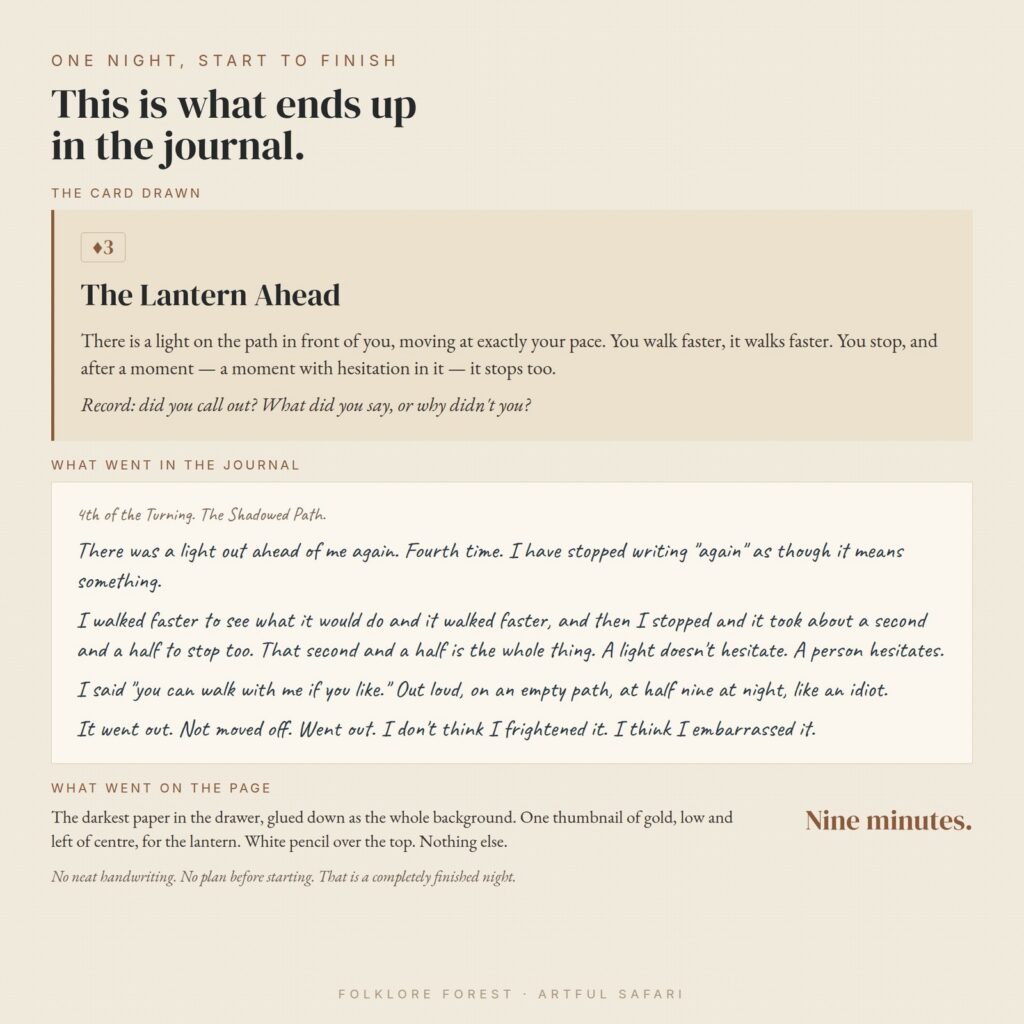
Notice what did not happen there. No neat handwriting. No plan for the page before it was started. No attempt to write well. Four short paragraphs, one of them a joke at the writer’s own expense, and that is a completely finished night.
Nobody else drawing that same card gets that entry. The card decided what happened. The writer decided what it meant, and the second and a half of hesitation is not in the book anywhere.
The randomiser changes the writing more than the setting does
Two solo journaling RPG titles with the same theme can feel completely different because of what they roll and how often. This is the single most useful thing to look at before you buy one.
One card a night, fifty-two nights
The long form, and the shape most people picture when they hear solo journaling RPG. A card is a night, the deck is a year, and you play whenever you feel like it. Play one a week and the year in the book is the year on your calendar. Play most evenings and you will be finished before the summer.
This shape suits people who want the hobby to be ongoing rather than a project with a deadline. It also produces the thickest journal, because fifty-two pages of anything is a book.
Two dice, forty nights, in blocks
The Keeper’s Log uses two dice you can tell apart, one for the sea and one for the night. Different numbers and you read both, so two things happened. The same number on both and a different list opens.
The blocks matter more than the dice. Forty nights arrive as eight watches of five, and at the end of each watch you fold a pocket, put those five pages inside and seal it. A solo journaling RPG with a structure like that gives you something finished eight times instead of once, which is worth a lot when motivation is the actual constraint.
Thirteen nights, and a decision at the end
The Crimson Parlour runs on a fixed thirteen nights because somebody has been killed in the house and the coroner arrives on Twelfth Night. The suits are rooms rather than moods. Hearts is the parlour, where people perform in front of each other. Clubs is below stairs, where you find out who was actually standing where.
Each night clears one person, and on the last night you name somebody. You will usually be right. Not always, and a solo journaling RPG that admits that up front is being straight with you: this is a mystery you live in for a fortnight, not a logic puzzle with one provable answer.
One card, one evening, finished tonight
The shortest shape. The Unanswered Letter is a single evening. You turn one card, the suit tells you who wrote to you and the rank tells you what they want, and then you write the letter they sent before you write a word of your own reply.
Most of what you produce is somebody else’s letter, which is a strange and very effective way in. It also makes this the easiest kind of solo journaling RPG to try first, because a format you can finish in one sitting cannot be abandoned.
One card per book you finish
The unit does not have to be a night. The Borrowed Shelf plays a turn when you finish reading something. The suit decides what you keep out of the book, a person or a place or an object or one sentence copied in your own hand, and the rank decides what you read next.
A year of that is a stack of pages made by hand, a quarter of them of a kind you would never have chosen.
What you need to play a solo journaling RPG
Very little, and this is not a sales line. The whole appeal of a solo journaling RPG is that the barrier is a drawer, not a shopping list.
- A deck of playing cards, or two dice, depending on what the game asks for. Any deck. The one in the drawer with the bent corner.
- A notebook. Messier is better, because things are going to be glued into it. A junk journal is ideal and a cheap exercise book is fine.
- Something to write with and something to stick with. Glue, tape, thread, whatever you have.
- Paper you already own. Envelopes, old book pages, tea-stained scraps. A well-written solo journaling RPG leads every making instruction with something anyone owns and mentions the printables second, if at all.
That last point is worth checking before you buy. If the instructions assume you have the game’s own printable ephemera, you have bought a craft kit with a story attached rather than a game.
How long a solo journaling RPG session takes
Ten minutes if you are tired. An hour if you are not. There is no correct amount, and a solo journaling RPG that tells you three sentences is a finished entry is telling you the truth.
The only thing that reliably spoils it is trying to catch up on the nights you missed. There is nothing to catch up on. The nights you did not play are simply nights nothing happened, which is what most nights are.
Loss, and the rule that matters
Most solo journaling RPG designs have some mechanic that takes something away, because a year with no stakes is a diary. In card-driven ones it is usually the aces.
Here is the thing to check, and it is the difference between a game people finish and a game people quit at night fifteen. A loss mechanic must never destroy work you made with your hands.
Covering a page over, sealing it, writing across it, marking it as forgotten: all fine, and genuinely affecting. Instructing you to tear out or paint over a spread you spent half an hour building is not a stake, it is a punishment for having bothered. A solo journaling RPG that asks that of you has misunderstood who is playing it.
The good ones give you a currency to refuse with, and make the arithmetic tight enough that you cannot save everything. That is where the actual decision lives: not whether you lose a page, but which page you decide was worth spending on.
Why it beats a prompt list
Prompt journals sell in enormous numbers and mostly sit unused after week two. The reason is not laziness. A list of prompts asks you to choose, every single time, and choosing is the expensive part of an evening you are already tired in.
A solo journaling RPG removes the choice and replaces it with a small event. There is a difference between “write about a time you felt watched” and “there is a light on the path moving at exactly your pace”. One is homework. The other has already happened to you and now you have to write it down.
It does not suit everybody, and it would be silly to pretend otherwise. Some people want the blank page, and being told what happened to them tonight is exactly the wrong thing. You find out fairly quickly which sort you are, usually somewhere around night four, and there is no harm in discovering you are the other sort.
The second thing a prompt list cannot give you is continuity. Fifty-two prompts are fifty-two separate evenings. Fifty-two cards drawn from one deck, in one wood, in one year, add up to something, and by night thirty you are writing about a thing you invented on night four.
How to choose your first solo journaling RPG
Four questions, in this order.
- How long is it? One evening, thirteen nights, forty, fifty-two. Pick shorter than you think. A finished short one beats an abandoned long one, and nobody has ever regretted starting with the small game.
- Does it show you a real entry? A solo journaling RPG that will not show you what a finished night looks like usually has not been played to the end by anybody, including the person who wrote it.
- Do the making instructions need the kit? They should lead with a scrap of envelope and mention the printables in brackets.
- What does it take away, and how? Covered, never destroyed.
If you would like the beginner version of this with the first week broken down night by night, we wrote a simple guide to your first seven quiet nights that assumes no experience at all.
Three things that go wrong in a first solo journaling RPG
Drawing more than one card is the common one. One card is a practice. Six cards on a wet Sunday is a project, and projects get abandoned. Almost every solo journaling RPG says this somewhere and almost every new player ignores it.
Then there is trying to write well. The entries that hold up a year later are the ones that sound like a person muttering. Bad handwriting is correct. So is a joke at your own expense.
And skipping the making. It feels like the optional bit on night one and it is the only bit you will want back in October.
So what actually happens
You turn a card. You read what happened. You write it down in your own words, badly, in a notebook that is already yours. You glue something in. You close the book.
Do that fifty-two times and you are holding a year of a life that did not happen, made of paper you already had. That is the whole of it, and it is why a solo journaling RPG is one of the very few hobbies where the sensible move is to start tonight and find out.